Know Where Your PC Connects
Visualize your PC's worldwide network connections in real-time. Identify unexpected processes, block unwanted IPs, and take control of your network activity.
Download for Windows 14 Mb | Free | Requires Full PC Access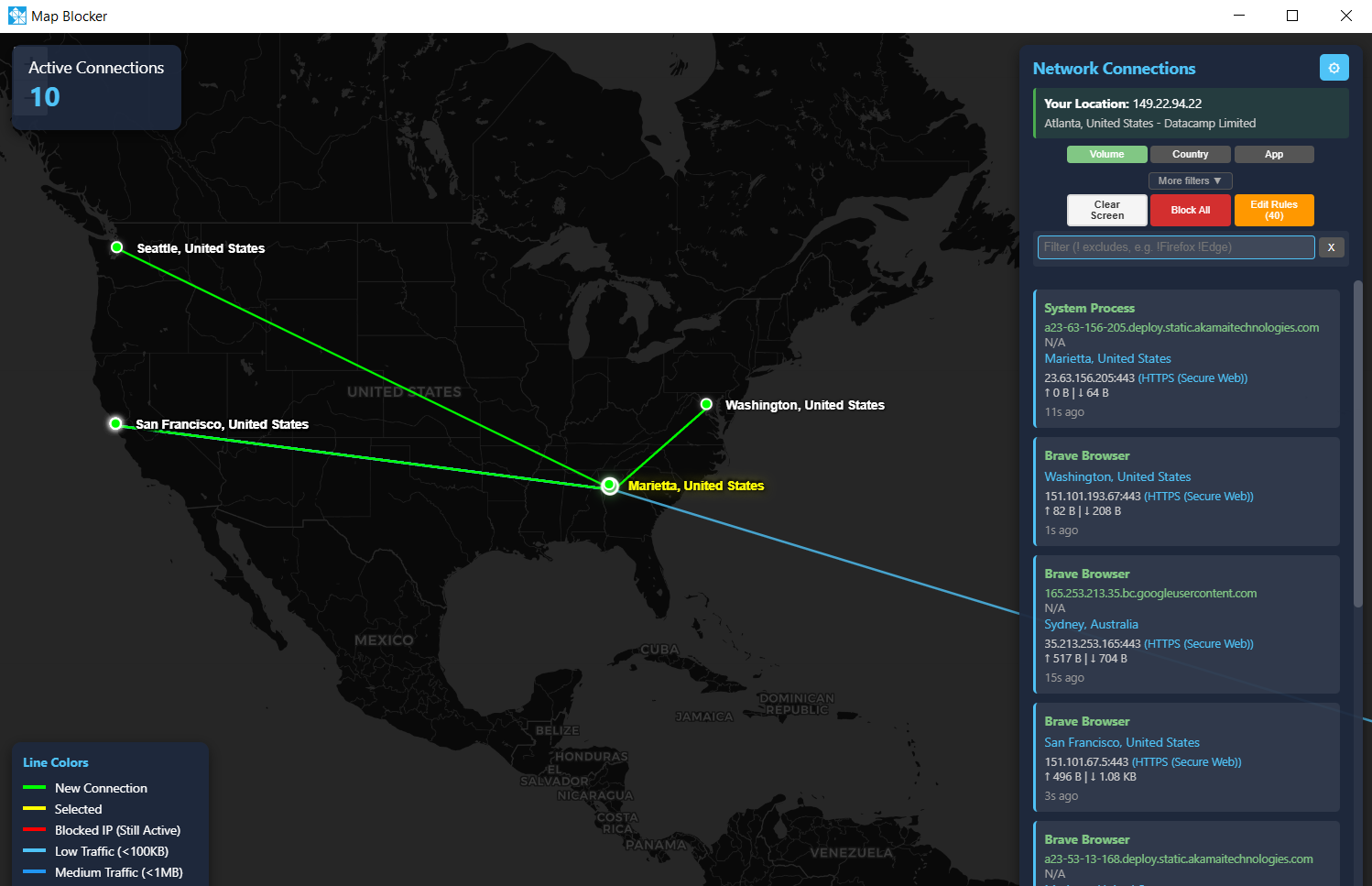
Visualize your PC's worldwide network connections in real-time. Identify unexpected processes, block unwanted IPs, and take control of your network activity.
Download for Windows 14 Mb | Free | Requires Full PC Access
See what your PC is really doing behind the scenes
See exactly where your PC is connecting to on a real-time world map. Every connection is plotted with its geographic location, giving you instant visibility into your network activity.
Spot unusual, unexpected, or suspicious processes making network connections. Find out which applications are sending data to unknown destinations without your knowledge.
Take immediate action by blocking any IP address directly through Windows Firewall. Block individual IPs or entire regions that shouldn't be communicating with your PC.
See where your PC is connecting to on a daily basis. Track network patterns, identify bandwidth-heavy applications, and understand your computer's background network behavior.
Know and control what your PC does in terms of worldwide network connectivity. Stop wondering what's happening in the background and take charge of your system's communications.
Every network connection is linked to its originating process. See exactly which application or service is responsible for each connection
Everything you need to monitor and control your network connections
Live packet capture shows connections as they happen
Automatic location lookup for every IP address
Block IPs directly through Windows Firewall rules
Block entire applications from network access
Download databases for instant lookups without API calls
Monitor bytes sent and received per connection
Reverse DNS and ASN information for each IP
Run as a native window or in your web browser
Sort by traffic volume, country, application, or recency
Get notified when blocked IPs still try to connect
Minimize to system tray for background monitoring
Efficient design with automatic memory cleanup
Map Blocker gives you complete visibility into your PC's network activity. Unlike traditional firewalls that work silently in the background, Map Blocker shows you exactly what's happening—every connection plotted on a map, every process identified, every byte counted. You see the full picture and decide what to allow or block. No hidden activity, no mystery connections—just clear, visual control over your network.